分类目录归档:C++

YOLOv8 实时推理库:TensorRT 8 到 TensorRT 10 适配指南

概述

本次更新为 YOLOv8 实时推理库添加了对 CUDA 12.9TensorRT 10 的完整支持,同时兼容原有的 CUDA 11.8 + TensorRT 8 架构。通过 NV_TENSORRT_MAJOR 宏定义(NV_TENSORRT_MAJOR == 8 为 TensorRT 8,NV_TENSORRT_MAJOR == 10 为 TensorRT 10)在源代码中条件编译不同版本的 API 调用。原TensorRT 8的代码来源于https://github.com/wang-xinyu/tensorrtx.git


核心适配策略

条件编译宏设计

model.cpp 等文件中使用 #if NV_TENSORRT_MAJOR 指令统一管理两个版本的差异:

#if NV_TENSORRT_MAJOR < 10
    // TensorRT 8 代码路径
    builder->createNetworkV2(0U);
#else
    // TensorRT 10 代码路径
    uint32_t flags = 1U << static_cast<uint32_t>(nvinfer1::NetworkDefinitionCreationFlag::kEXPLICIT_BATCH);
    builder->createNetworkV2(flags);
#endif

通过 NV_TENSORRT_MAJOR 宏在编译时自动选择对应版本的 API,无需运行时判断。


主要适配内容

1. 网络定义创建方式

TensorRT 8(旧版本):

nvinfer1::INetworkDefinition* network = builder->createNetworkV2(0U);

TensorRT 10(新版本):

uint32_t flags = 1U << static_cast<uint32_t>(nvinfer1::NetworkDefinitionCreationFlag::kEXPLICIT_BATCH);
nvinfer1::INetworkDefinition* network = builder->createNetworkV2(flags);

变更原因:TensorRT 10 引入了显式批处理(Explicit Batch)要求,必须在创建网络时设置 kEXPLICIT_BATCH 标志。


2. 输入张量维度定义

TensorRT 8

nvinfer1::ITensor* data = network->addInput(kInputTensorName, dt,
    nvinfer1::Dims3{3, kInputH, kInputW});  // CHW 格式

TensorRT 10

nvinfer1::ITensor* data = network->addInput(kInputTensorName, dt,
    nvinfer1::Dims{4, {kBatchSize, 3, kInputH, kInputW}});  // NCHW 格式

变更原因:TensorRT 10 强制使用 NCHW(N为batch维度)格式,而 TensorRT 8 支持隐式批处理的 CHW 格式。


3. 模型构建接口变更

3.1 调整大小层(Resize Layer)

TensorRT 8

upsample10->setResizeMode(nvinfer1::ResizeMode::kNEAREST);
upsample10->setScales(scale, 3);  // scale 数组长度为3

TensorRT 10

upsample10->setResizeMode(nvinfer1::InterpolationMode::kNEAREST);
upsample10->setScales(scale, 4);  // scale 数组长度为4,新增 batch 维度

变更原因:TensorRT 10 的 resize 层需为 batch 维度提供插值系数,scale 数组从 [1.0, 2.0, 2.0] 扩展为 [1.0, 1.0, 2.0, 2.0]

3.2 卷积层(Convolution Layer)

TensorRT 8

conv22_cv3_0_2->setStride(nvinfer1::DimsHW{1, 1});
conv22_cv3_0_2->setPadding(nvinfer1::DimsHW{0, 0});

TensorRT 10

conv22_cv3_0_2->setStrideNd(nvinfer1::Dims{2, {1, 1}});
conv22_cv3_0_2->setPaddingNd(nvinfer1::Dims{2, {0, 0}});

变更原因

  • setStride/PaddingsetStrideNd/PaddingNd:多维接口更灵活
  • 参数从 DimsHW 改为 Dims,支持任意维度组合

3.3 全连接层(Fully Connected Layer)→ 卷积层

TensorRT 8

nvinfer1::IFullyConnectedLayer* yolo = network->addFullyConnected(
    *pool2->getOutput(0), kClsNumClass,
    weightMap["model.9.linear.weight"], weightMap["model.9.linear.bias"]);

TensorRT 10

nvinfer1::IConvolutionLayer* yolo = network->addConvolutionNd(
    *pool2->getOutput(0),
    kClsNumClass,
    nvinfer1::DimsHW{1, 1},
    weightMap["model.9.linear.weight"], weightMap["model.9.linear.bias"]);

变更原因:TensorRT 10 废弃了 addFullyConnected,统一使用 addConvolutionNd 实现。

3.4 池化层输出维度

TensorRT 8

nvinfer1::IPoolingLayer* pool2 = network->addPoolingNd(
    *conv_class->getOutput(0), nvinfer1::PoolingType::kAVERAGE,
    nvinfer1::DimsHW{dims.d[1], dims.d[2]});

TensorRT 10

nvinfer1::IPoolingLayer* pool2 = network->addPoolingNd(
    *conv_class->getOutput(0), nvinfer1::PoolingType::kAVERAGE,
    nvinfer1::DimsHW{dims.d[2], dims.d[3]});

变更原因:维度索引适配 NCHW 格式。


4. DFL(Distribution Focal Loss)层适配

4.1 Reshape 维度

TensorRT 8

shuffle1->setReshapeDimensions(nvinfer1::Dims3{4, 16, grid});
shuffle1->setSecondTranspose(nvinfer1::Permutation{1, 0, 2});

TensorRT 10

shuffle1->setReshapeDimensions(nvinfer1::Dims4{0, 4, 16, grid});
shuffle1->setSecondTranspose(nvinfer1::Permutation{0, 2, 1, 3});

变更原因

  • Dims 从 3D 扩展为 4D(添加 batch 维度)
  • Permutation 索引适配 4D 张量

4.2 SoftMax 轴设置

TensorRT 10 新增

softmax->setAxes(1U << 1);  // 在第2维(channel维度)计算 SoftMax

变更原因:TensorRT 10 引入了 setAxes 接口来指定 SoftMax 的计算轴,而 TensorRT 8 在创建层时隐式确定。

4.3 后续 Shuffle Reshape

TensorRT 8

shuffle2->setReshapeDimensions(nvinfer1::Dims2{4, grid});

TensorRT 10

shuffle2->setReshapeDimensions(nvinfer1::Dims3{0, 4, grid});

变更原因:添加 batch 维度。


5. Concatenation 层轴设置

TensorRT 10 新增

cat22_dfl_0->setAxis(1);
cat22_dfl_1->setAxis(1);
cat22_dfl_2->setAxis(1);

变更原因:TensorRT 10 需要显式指定拼接的维度,默认为轴 1(channel 维度)。


6. Shuffl e 层和 Slice 层

TensorRT 8

shuffle22_0->setReshapeDimensions(nvinfer1::Dims2{64 + kNumClass,
    (kInputH / strides[0]) * (kInputW / strides[0])});

nvinfer1::ISliceLayer* split22_0_0 = network->addSlice(
    *shuffle22_0->getOutput(0), nvinfer1::Dims2{0, 0},
    nvinfer1::Dims2{64, (kInputH / strides[0]) * (kInputW / strides[0])},
    nvinfer1::Dims2{1, 1});

TensorRT 10

shuffle22_0->setReshapeDimensions(nvinfer1::Dims3{kBatchSize, 64 + kNumClass,
    (kInputH / strides[0]) * (kInputW / strides[0])});

nvinfer1::ISliceLayer* split22_0_0 = network->addSlice(
    *shuffle22_0->getOutput(0), nvinfer1::Dims3{0, 0, 0},
    nvinfer1::Dims3{kBatchSize, 64, (kInputH / strides[0]) * (kInputW / strides[0])},
    nvinfer1::Dims3{1, 1, 1});

变更原因:所有维度添加 batch 维度(维度索引从 1D → 2D,2D → 3D)。


7. Builder 配置接口

TensorRT 8

builder->setMaxBatchSize(kBatchSize);
config->setMaxWorkspaceSize(16 * (1 << 20));

TensorRT 10

config->setMemoryPoolLimit(nvinfer1::MemoryPoolType::kWORKSPACE, 16 * (1 << 20));

变更原因

  • setMaxBatchSize 移至 IBuilder 接口
  • setMaxWorkspaceSize 改为 setMemoryPoolLimit,类型为 MemoryPoolType::kWORKSPACE

8. 推理执行接口

8.1 反序列化接口更新

TensorRT 8

deserialize_engine(std::wstring &engine_name,
    nvinfer1::IRuntime** runtime,
    nvinfer1::ICudaEngine** engine,
    nvinfer1::IExecutionContext** context);

TensorRT 10

deserialize_engine(std::wstring &engine_name,
    nvinfer1::IRuntime** runtime,
    nvinfer1::ICudaEngine** engine,
    nvinfer1::IExecutionContext** context,
    nvinfer1::ICudaEngine** engine_10);  // 新增参数

变更原因:需要分离 TensorRT 8 和 10 的引擎接口(虽然尚未实际使用)。

8.2 输出张量获取方式

TensorRT 8

auto out_dims = engine->getBindingDimensions(1);
model_bboxes = out_dims.d[0];

TensorRT 10

const char* output_name = engine->getIOTensorName(1);
auto out_dims = engine->getTensorShape(output_name);
model_bboxes = out_dims.d[0];

变更原因

  • TensorRT 10 不再支持通过索引绑定获取维度
  • 必须通过 getIOTensorName() 获取张量名称

8.3 内存缓冲区绑定方式

TensorRT 8

context.enqueue(batchsize, buffers, stream, nullptr);

TensorRT 10

context.setInputShape(kInputTensorName, nvinfer1::Dims{4, {batchsize, 3, kInputH, kInputW}});
context.setTensorAddress(kInputTensorName, buffers[0]);
context.setTensorAddress(kOutputTensorName, buffers[1]);
context.enqueueV3(stream);

变更原因

  • 推理方法从 enqueue 改为 enqueueV3(异步执行接口)
  • 需要显式设置输入输出张量的地址和形状
  • setInputShapeenqueueV3 之前调用

8.4 绑定数量断言

TensorRT 8

assert(engine->getNbBindings() == 2);
const int inputIndex = engine->getBindingIndex(kInputTensorName);
const int outputIndex = engine->getBindingIndex(kOutputTensorName);

TensorRT 10

// 删除 getNbBindings() 检查
const char* input_name = engine->getIOTensorName(0);
const char* output_name = engine->getIOTensorName(1);

变更原因:TensorRT 10 不再使用 “bindings” 概念,改用张量(tensor)概念。


兼容性文件结构

头文件 types.hyolov8det.hyolov8cls.hyolov8seg.h 保持不变,确保上层接口无需修改。

条件编译宏 NV_TENSORRT_MAJOR 通过编译器宏定义传入:

  • TensorRT 8NV_TENSORRT_MAJOR 定义为 8
  • TensorRT 10NV_TENSORRT_MAJOR 定义为 10

总结

本次适配通过 #if NV_TENSORRT_MAJOR 条件编译策略,实现了从 TensorRT 8 到 TensorRT 10 的平滑迁移:

✅ 显式批处理(Explicit Batch)支持
✅ NCHW 输入格式统一
✅ API 接口现代化(enqueueV3setTensorAddress
✅ 向后兼容旧版本(通过宏切换)
✅ 清晰的代码分支管理

开发人员只需在编译时定义 NV_TENSORRT_MAJOR10,即可自动使用 TensorRT 10 的所有 API,无需手动修改业务逻辑。

Yolov5 使用 TensorRT 进行加速

Yolov5是比较常见的机器学习模型,速度也很快,使用GPU几毫秒内就可以完成推理预测。但这就是其极限速度吗?github上Yolov5的介绍里,小模型可以跑到1ms以内,我尝试了一下,最小的模型,小图片都要3~4毫秒。后来发现要用到TensorRT速度才可以更快。下面就看看TensorRT的代码怎么写。

一.生成yolov5模型

训练生成的方法参考github上的方法进行 https://github.com/ultralytics/yolov5 。记住使用了什么大小的yolo模型和是目标识别 还是图片分类,这些后面会用到。

二.生成TensorRt可以调用的模型

生成方法参考了github上的tensorrtx项目 https://github.com/wang-xinyu/tensorrtx

1.生成wts文件

对应的python代码位置 https://github.com/wang-xinyu/tensorrtx/blob/master/yolov5/gen_wts.py

假如你是图片分类的模型,yolo训练出的模型是 best.pt,则生成wts的命令为

python gen_wts.py -w best.pt -o broken.wts -t cls

-w 输入的模型名字

-o 输出的模型名字

-t 模型类型 cls代表图片分类

2.将wts文件转换为engine文件,并导入运行。

根据我自己的理解TensorRT速度快的原因是将模型直接编译成了显卡可以直接运算的机器码,因此不同型号的显卡使用的机器码模型文件是不同的,需要特别生成。

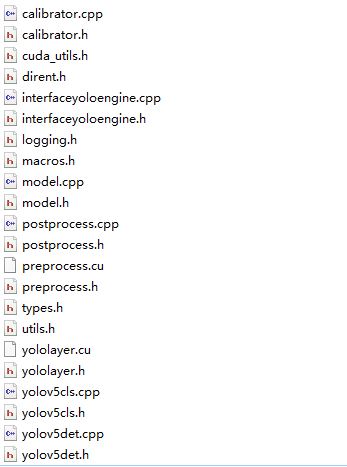
github上的tensorrtx项目虽然有c++的实现代码,但没有采用c++类的写法,而且有许多公共变量,不方便同一个程序,调用不同类型 不同大小的模型文件。因此进行了部分改写。文件结构如下图

全部文件打包在如下压缩包里面

生成模型的使用方法如下:

#include "yolov5det.h"
#include "yolov5cls.h"

int main(int argc, char** argv) {
    yolov5det _yolov5det;
    yolov5cls _yolov5cls;

    string outputfilename = "best.engine";//输出
    string engine = std::string("best.wts");//输入
    _yolov5det.createngine(engine,outputfilename,'s');// s 表示 yolov5s 模型

    string outputfilename = "cls.engine";//输出
    string engine = std::string("cls.wts");//输入
    _yolov5cls.createngine(engine,outputfilename,'s');// s 表示 yolov5s 模型
}

进行预测的使用方法

#include "yolov5det.h"
#include "yolov5cls.h"

#include "opencv2/imgcodecs.hpp"

using namespace std;
using namespace cv;

int main(int argc, char** argv) {
    yolov5det _yolov5det;
    yolov5cls _yolov5cls;
    clock_t starttime, endtime;

    string enginedet = "best.engine";
    _yolov5det.setengine(enginedet);//设置模型
    _yolov5det.kConfThresh = 0.75;//设置kConfThresh参数
    _yolov5det.kNmsThresh = 0.35;//设置kNmsThresh参数
	
	
    Mat img_det = imread("det.bmp",IMREAD_COLOR); //导入图片
    starttime = clock();
    std::vector<std::vector<Detection>> res_batch = _yolov5det.detect(img_det); //预测
    endtime = clock();
    cout << (double)(endtime - starttime) << endl;

    if(res_batch.size()>0){
        for(int n =0;n<res_batch[0].size();n++){//res_batch[0] 测试的模型输入只有1张图片
            cout<<res_batch[0][n].bbox[3]<<endl;//res_batch[0][n] 的属性里有box的位置,分类,分值等信息
            cout<<res_batch[0][n].bbox[2]<<endl;
        }
    }


    string enginecls = "cls.engine";
    _yolov5cls.setengine(enginecls);//设置模型
	
    Mat img_cls = imread("cls.bmp",IMREAD_COLOR);
    starttime = clock();
    std::vector<std::vector<int>> res_batch = _yolov5cls.detect(img_cls);
    endtime = clock();
    cout << (double)(endtime - starttime) << endl;

    if(res_batch.size()>0){
        cout<<"classid:"<<res_batch[0][0]<<endl;// 分类的id
    }
}

使用TorchSharp 调用 PyTorch 语义分割神经网络模型

TorchSharp 是对 Torch c++的封装,基本继承了c++的全部接口。但使用中会有一些小问题,需要特别注意一些。

  1. 语义分割(semantic segmentation)神经网络训练

训练的代码可以参考github里的官方代码 https://github.com/pytorch/vision/tree/main/references/segmentation

2.模型输出

官方代码的模型 默认输出是list 虽然可以强制输出script文件,但TorchSharp 调用后会报错”Expected Tensor but got GenericDict”.因此需要修改网络

export代码如下:

import torch
import torchvision
from torch import nn
import numpy as np

class MyModel(nn.Module):
    def __init__(self):
        super().__init__()
        self._model = torchvision.models.segmentation.lraspp_mobilenet_v3_large(num_classes=2,
                aux_loss=False,
                pretrained=False)
        
        #修改了输入,将输入改为单通道图片
        #如果输入的是3通道 则不需要修改
        for item in self._model.backbone.items():          
            item[1][0] = nn.Conv2d(1, 16, kernel_size=(3, 3), stride=(2, 2), padding=(1, 1), bias=False)
            break                                                         
                                                                 
        checkpoint = torch.load('model/model_119.pth', map_location='cpu')
        self._model.load_state_dict(checkpoint['model'], strict=not True)
        self._model.eval()
        
    def forward(self, x):
        # 修改了输出,将List修改为Tensor 并进行了 argmax 和 转float操作
        result = self._model.forward(x)
        return result["out"].argmax(1).flatten().float()


model = MyModel()
x = torch.rand(1,1, 240, 400)
predictions = model(x)

#使用torch.jit.trace 输出 script pt 网络文件
traced_script_module = torch.jit.trace(model, x)
traced_script_module.save('_seg.pt') 

3.使用TorchSharp 进行预测

由于测试程序使用了opencvsharp,所以下面的代码使用了opencv来读取图片和简单的数据预处理,并使用opencv可视化输出

//导入网络
torch.jit.ScriptModule torch_model;
torch_model = torch.jit.load("_seg.pt");

//导入图片,并使用BlobFromImage 进行数据类型 维度 和归一化的转换
Mat temp = Cv2.ImRead("Pic_42633.bmp", ImreadModes.Grayscale);
Mat tensor_mat = OpenCvSharp.Dnn.CvDnn.BlobFromImage(temp, 1 / 255.0);

//初始化输入的tensor
float[] data_bytes = new float[tensor_mat.Total()];
Marshal.Copy(tensor_mat.Data, data_bytes, 0, data_bytes.Length);
torch.Tensor x = torch.tensor(data_bytes, torch.ScalarType.Float32);

//维度转换 和 normalize(进行normalize是因为官方代码里有这一步处理)
x = x.reshape(1, 1, 240, 400);
x = TorchSharp.torchvision.transforms.functional.normalize(x, new double[] { 0.485 }, new double[] { 0.229 });

DateTime date1 = DateTime.Now;
//进行预测
torch.Tensor _out = torch_model.forward(x);
DateTime date2 = DateTime.Now;
TimeSpan ts = date2 - date1;
Console.WriteLine("No. of Seconds (Difference) = {0}", ts.TotalMilliseconds);
Console.WriteLine(_out);

//使用opencv 将预测出的tensor输出为可视化的图片
Mat result_mat = new Mat(240, 400, MatType.CV_32FC1, _out.bytes.ToArray());
result_mat.ConvertTo(result_mat, MatType.CV_8UC1);
Cv2.ImWrite("mask.bmp", result_mat);

CUDA + subPixel + EDGE 边缘检测

子像素的边缘检测算法很多,但使用CUDA进行的不是很多。github上可以找到一个带CUDA的子像素边缘检测算法,但经过运行发现有些小bug,其cpu版本正常,但gpu版本找轮廓时会偶发轮廓被切断的问题。一下就对其进行一些修正。当然也许还有其他bug~~

一.源项目位置

源项目位置https://github.com/CsCsongor/subPixelEdgeDetect 。算法基于论文https://www.ipol.im/pub/art/2017/216/

二.代码分析

通过分析,主要是因为使用CUDA后,导入了线程。而原有CPU算法是单线程的。在涉及到最优前向轮廓或最优后向轮廓的求解时,会因为多线程,导致没有找到最优轮廓,而保留了2个轮廓信息。
就是源算法中cu_chain_edge_points这个函数里的下面这段代码

if (fwd >= 0 && next[from] != fwd && ((alt = prev[fwd]) < 0 || chain(alt, fwd, Ex, Ey, Gx, Gy, rows, cols) < fwd_s)){
	if (next[from] >= 0){			// Remove previous from-x link if one */
		prev[next[from]] = -1;	// Only prev requires explicit reset  */
	}
	next[from] = fwd;					// Set next of from-fwd link          */
	if (alt >= 0){						// Remove alt-fwd link if one
		next[alt] = -1;					// Only next requires explicit reset
	}
	prev[fwd] = from;					// Set prev of from-fwd link
}
if (bck >= 0 && prev[from] != bck && ((alt = next[bck]) < 0 || chain(alt, bck, Ex, Ey, Gx, Gy, rows, cols) > bck_s)){
		if (alt >= 0){					// Remove bck-alt link if one
			prev[alt] = -1;				// Only prev requires explicit reset
		}
		next[bck] = from;				// Set next of bck-from link
		if (prev[from] >= 0){		// Remove previous x-from link if one
			next[prev[from]] = -1; // Only next requires explicit reset
		}
		prev[from] = bck;				// Set prev of bck-from link
}

而原作者好像也发现了这个问题,在拼接所有轮廓的时候,并没有使用cpu版本里的代码去先找每一个轮廓的起始点,然后再拼接轮廓,而是从任意点开始。这样就会导致轮廓被切断了。
以下list_chained_edge_points 函数中的注释掉的那行代码,就是找轮廓起始点的算法。

// Set k to the beginning of the chain, or to i if closed curve
// for (k = i; (n = prev[k]) >= 0 && n != i; k = n); //这句被注释了,替换成了下面这行
if ((n = prev[i]) >=0 && n != i){ k= n;}

三.算法修改

1.修改cu_chain_edge_points函数。 寻找最优5*5轮廓点的算法屏蔽,先记录下所有向前向后轮廓点

// Chain edge points
__global__
void cu_chain_edge_points(int * next, int * prev, double * Ex,	double * Ey,double * Gx, double * Gy, int rows, int cols){
	int x, y, i , j, alt;
	int dx, dy, to;

	x = blockIdx.x*blockDim.x+threadIdx.x+2;
	y = blockIdx.y*blockDim.y+threadIdx.y+2;

	// Try each point to make local chains
	// 2 pixel margin to include the tested neighbors
	if (x < (rows-2) && y < (cols-2)){
		// Must be an edge point
		if (Ex[x + y*rows] >= 0.0 && Ey[x + y*rows] >= 0.0){
			int from = x + y*rows;  // Edge point to be chained
			double fwd_s = 0.0;  	  // Score of best forward chaining
			double bck_s = 0.0;     // Score of best backward chaining
			int fwd = -1;           // Edge point of best forward chaining
			int bck = -1;           // Edge point of best backward chaining

			/* try all neighbors two pixels apart or less.
				looking for candidates for chaining two pixels apart, in most such cases,
				is enough to obtain good chains of edge points that	accurately describes the edge.
			*/
			for (i = -2; i <= 2; i++){
				for (j = -2; j <= 2; j++){
					to = x + i + (y + j)*rows; // Candidate edge point to be chained

					double s = chain(from, to, Ex, Ey, Gx, Gy, rows, cols);  //score from-to

					if (s > fwd_s){ // A better forward chaining found
						fwd_s = s;
						fwd = to;
					} else if (s < bck_s){ // A better backward chaining found
						bck_s = s;
						bck = to;
					}
				}
			}

            if (fwd >= 0){
                next[from] = fwd;					// Set next of from-fwd link
            }
            if (bck >= 0){
                prev[from] = bck;				// Set prev of bck-from link
            }

//			if (fwd >= 0 && next[from] != fwd && ((alt = prev[fwd]) < 0 || chain(alt, fwd, Ex, Ey, Gx, Gy, rows, cols) < fwd_s)){
//				if (next[from] >= 0){			// Remove previous from-x link if one */
//					prev[next[from]] = -1;	// Only prev requires explicit reset  */
//				}
//				next[from] = fwd;					// Set next of from-fwd link          */
//				if (alt >= 0){						// Remove alt-fwd link if one
//					next[alt] = -1;					// Only next requires explicit reset
//				}
//				prev[fwd] = from;					// Set prev of from-fwd link
//			}
//			if (bck >= 0 && prev[from] != bck && ((alt = next[bck]) < 0 || chain(alt, bck, Ex, Ey, Gx, Gy, rows, cols) > bck_s)){
//					if (alt >= 0){					// Remove bck-alt link if one
//						prev[alt] = -1;				// Only prev requires explicit reset
//					}
//					next[bck] = from;				// Set next of bck-from link
//					if (prev[from] >= 0){		// Remove previous x-from link if one
//						next[prev[from]] = -1; // Only next requires explicit reset
//					}
//					prev[from] = bck;				// Set prev of bck-from link
//			}
		}
	}
}

2.增加一个cu_cut_edge_points函数来完成单点最后向前向后轮廓的选择,切掉不是最优的轮廓

__global__
void cu_cut_edge_points(int * next, int * prev, double * Ex,	double * Ey,double * Gx, double * Gy, int rows, int cols){
    int x, y, i , j, alt;
    int dx, dy, to;

    x = blockIdx.x*blockDim.x+threadIdx.x+2;
    y = blockIdx.y*blockDim.y+threadIdx.y+2;

    if (x < (rows-2) && y < (cols-2)){
        if (Ex[x + y*rows] >= 0.0 && Ey[x + y*rows] >= 0.0){
            int center = x + y*rows;
            int temp_next = -1;
            int temp_prev = -1;

            if (x < (rows-2) && y < (cols-2)){
                for (i = -2; i <= 2; i++){
                    for (j = -2; j <= 2; j++){
                        to = x + i + (y + j)*rows;
                        if(next[to] == center){
                            if(temp_next >= 0){
                                if(chain(center, to, Ex, Ey, Gx, Gy, rows, cols) > chain(center, temp_next, Ex, Ey, Gx, Gy, rows, cols)){
                                    next[temp_next] = -1;
                                    temp_next = to;
                                } else {
                                    next[to] = -1;
                                }
                            } else {
                                temp_next = to;
                            }
                        }

                        if(prev[to] == center){
                            if(temp_prev >= 0){
                                if(chain(center, to, Ex, Ey, Gx, Gy, rows, cols) < chain(center, temp_prev, Ex, Ey, Gx, Gy, rows, cols)){
                                    prev[temp_prev] = -1;
                                    temp_prev = to;
                                } else {
                                    prev[to] = -1;
                                }
                            } else {
                                temp_prev = to;
                            }
                        }
                    }
                }
            }
        }
    }
}

3.修改cu_thresholds_remove函数,删掉一些错误的轮廓

__global__
void cu_thresholds_remove(int * next, int * prev,int rows, int cols, int * valid){
	int x, y;

	x = blockIdx.x*blockDim.x+threadIdx.x;
	y = blockIdx.y*blockDim.y+threadIdx.y;
	int idx = x+y*rows;

	if (idx < rows*cols){
		if ((prev[idx] >= 0 || next[idx] >= 0) && !valid[idx]){
			prev[idx] = next[idx] = -1;
		}

        if(prev[idx] != -1 && next[prev[idx]] != idx){
            prev[idx] = -1;
        }
        if(next[idx] != -1 && prev[next[idx]] != idx){
            next[idx] = -1;
        }
	}
}

4.修改list_chained_edge_points函数,重新启用找寻轮廓起始点的代码

// Set k to the beginning of the chain, or to i if closed curve
for (k = i; (n = prev[k]) >= 0 && n != i; k = n);
//if ((n = prev[i]) >=0 && n != i){ k= n;}

5.修改devernay函数,增加刚才添加的函数

cu_chain_edge_points<<<numberOfBlocks, threadsPerBlock, threadsPerBlock.x*threadsPerBlock.y*sizeof(uchar), stream>>>(next, prev, Ex, Ey, Gx, Gy, rows, cols);
cudaDeviceSynchronize();
cu_cut_edge_points<<<numberOfBlocks, threadsPerBlock, threadsPerBlock.x*threadsPerBlock.y*sizeof(uchar), stream>>>(next, prev, Ex, Ey, Gx, Gy, rows, cols);
cudaDeviceSynchronize();
cu_thresholds_with_hysteresis<<<numberOfBlocks, threadsPerBlock, threadsPerBlock.x*threadsPerBlock.y*sizeof(uchar), stream>>>(next, prev, modG, rows, cols, th_high, th_low, valid);
cudaDeviceSynchronize();

完整的代码请下载 subPixelGPU.zip

使用GSL C++库解2元非线性方程组

解方程是一个比较常见的功能,matlab,python都有简单方法实现。C++也有不少实现方法,下面就介绍一下GSL解方程的方法,代码参考了GSL源码中的demo。
GSL解方程的功能相对matlab要简单一些,目前看只支持实数解,并且只有一个解。当然对于大部分实际应用 已经足够了

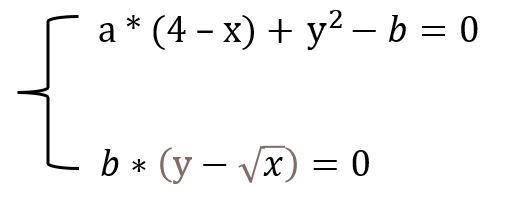
假设需要解的方程组是如下2元非线性方程(方程右边不为0,移项一下就好了)

继续阅读